There is a category of work that finance teams across most organisations repeat every month - and that should not exist. Exporting balance sheets into spreadsheets. Reconciling totals across three different views of the same number. Reformatting a P&L by hand because the accounting system stores the data, but never in the shape leadership wants to read. The numbers your finance function spends a week assembling are already inside the accounting platform. Xero knows them. QuickBooks knows them. Moneo knows them. The gap is not the data - the gap is be tween what those systems contain and what your decision-makers can act on without waiting for someone to assemble it. Connecting your accounting platform to Power BI closes that gap. Not as a one-time export. As a perma nent connection between the system that records what happened and the dashboards that should be shaping what happens next.
This is not about prettier dashboards. It is about closing the gap between what your accounting system already knows and what your leadership team can act on.
The Monthly Reporting Tax
Every finance team that runs without an integration pays the same tax in the same currency: time. The se nior finance person spends three to five days a month rebuilding the same reports from the same exports - P&L, cash flow, ageing reports, supplier comparisons. Numbers are reconciled by hand. Inconsistencies between the spreadsheet and the system are debugged before they are surfaced to leadership. The cost is not just hours. It is also the lag. By the time the report is reviewed, the data is already two to three weeks stale. Decisions based on a report dated three weeks ago are not the same quality as decisions based on yesterday's numbers - and the gap compounds over time.
What an Accounting × Power BI Integration Actually Is
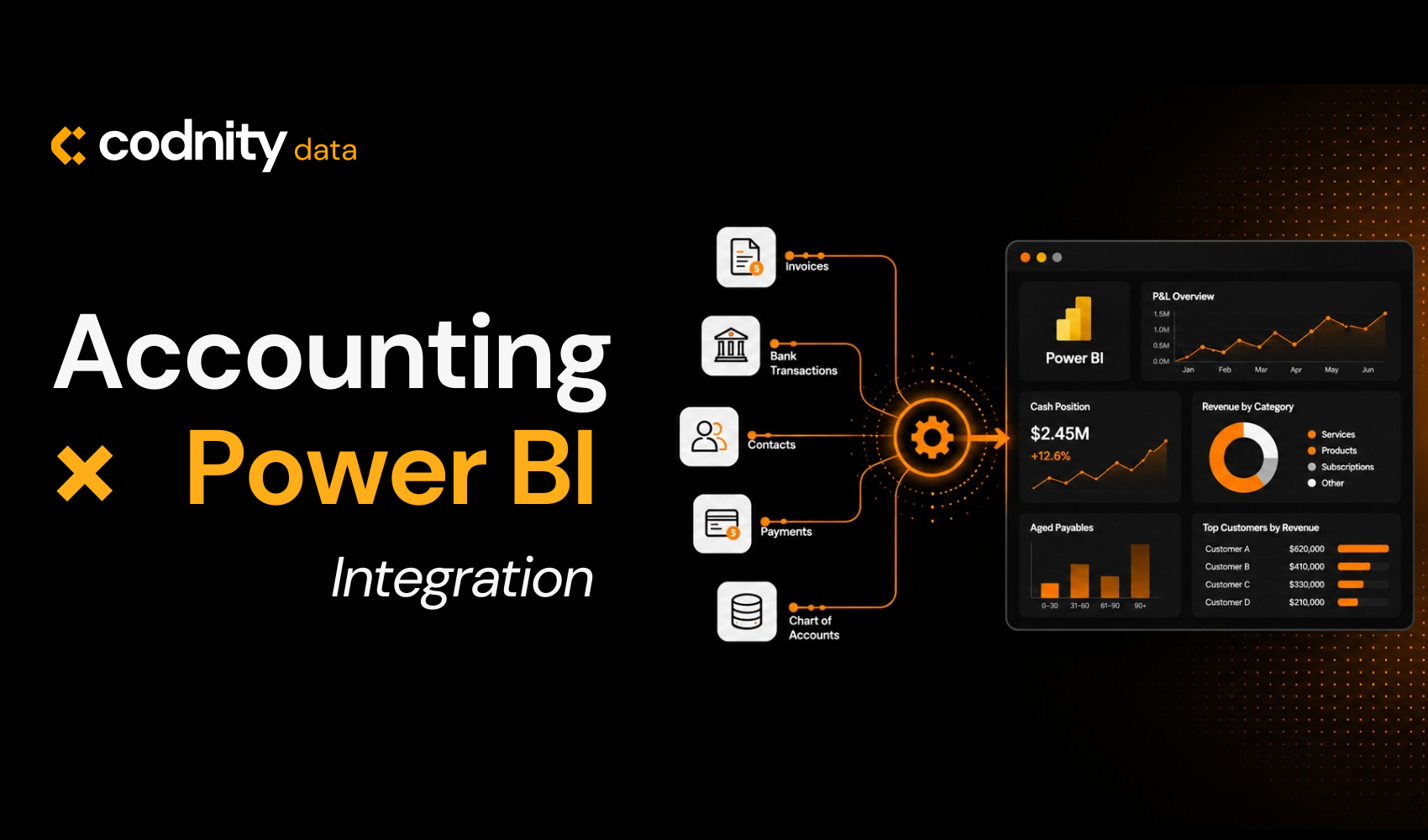
An accounting–Power BI integration is a structured, automated pipeline that extracts data from your accounting system via API (or a structured export route), models it in Power BI according to financial-re porting best practice, and delivers live dashboards that refresh on a schedule without manual intervention. It is not a one-time connector. The chart of accounts, journals, invoices, payments, bank movements, and contact data flow into Power BI continuously. The dashboards built on that data update automatically - typically daily, but configurable to whatever your reporting cadence requires. The result is a finance environment where the accounting data your team is already producing becomes decision-ready intelligence. A live P&L. A current cash position. A real-time supplier ageing view. Drill down from a quarterly figure to the underlying invoice in two clicks.
What Running Without It Actually Looks Like
The finance team without the integration
Spends the first week of every month rebuilding last month's reports. Reconciles figures across three ex ports, often by hand. Has a P&L that is accurate as of three weeks ago. Cannot produce an ad-hoc cash flow view without senior finance time. Discovers margin problems quarterly - long after the products or projects causing them have continued running.
The finance team with the integration
Sees the live P&L. Drills from any consolidated figure to the underlying transaction. Produces ad-hoc views in minutes, not days. Identifies margin compression while it is still recoverable. Walks into the monthly leadership meeting with numbers that are current and trustworthy, not last month's snapshot rebuilt by hand.
The difference between these two teams is not budget or accounting sophistication. It is whether someone decided to connect the data that already exists to the intelligence that should be acting on it.
Why the Semantic Model Decides Everything
Most organisations think the value of a finance integration is in the dashboards. The dashboards matter, but they are downstream of something more important: the semantic model that sits underneath them.
An accounting system stores a chart of accounts that reflects regulatory and bookkeeping requirements - not the way leadership thinks about the business. Revenue might be split into five accounts that should roll up into three reporting categories. Expenses might be coded for tax purposes in ways that obscure how the business actually consumes money. A raw connection to Power BI surfaces all of that complexity without resolving it. You get numbers - but not numbers that match how the business reads itself.
Building the integration properly means doing the modelling work first: mapping the chart of accounts to the reporting structures leadership uses, establishing relationships between transactions and contacts, designing multi-entity and multi-currency consolidation that reflects the real org structure, and codifying the metric definitions so that "EBITDA" or "operating margin" mean exactly the same thing every time some one asks.
When the model is right, the dashboards are straightforward. When the model is skipped, every report becomes a debate about which version of the number is correct.
What the Integration Makes Possible
Once accounting data flows cleanly into Power BI, the reporting questions that previously required senior finance hours become routine. P&L and balance sheet reporting becomes continuous - automatically refreshed, not manually rebuilt. Cash flow analysis (direct or indirect, depending on what your finance team prefers) becomes a dashboard rather than a quarterly project. Supplier and client ageing views update in real time, with drilldowns to the individual invoice.
Margin analysis shifts from a year-end exercise to an ongoing measurement. Budget-versus-actual vari ance becomes visible at the line-item level, by department, by cost centre, or by entity. Trends become legible - revenue seasonality, expense drift, working capital cycles - because the data is no longer trapped in monthly exports.
And because Power BI can combine accounting data with other sources - sales pipeline data from a CRM, project data from ClickUp, operational data from custom systems - the integration becomes a foundation for a broader financial analytics layer, not just a finance reporting tool.
How the Integration Is Built
The process Codnity Data uses to deliver accounting × Power BI integrations follows four phases, each of which is necessary for the result to be reliable and durable.
Understanding the reporting structure and financial cadence
We review the chart of accounts, current reporting formats, and the financial KPIs leadership actually relies on- revenue trends, margin structure, cash conversion, working capital, receivables and payables health. We define the reporting cadence (daily, weekly, monthly) and the consolidation requirements (single-entity, multi-entity, multi-currency). The scope is established and the dashboards are designed before any code is written.
Connecting the accounting system and building the semantic model
We connect to Xero, QuickBooks, Moneo, or an equivalent system via API or structured export pipeline. We extract the chart of accounts, journals, invoices, payments, bank movements, and contact data. We clean, map, and model that data in Power BI using accounting best practice - establishing relationships, building calculated columns, codifying DAX measures, and designing a scalable model that supports his torical tracking and future extension.
Building dashboards that finance actually uses
We deliver CFO-ready dashboards for P&L, balance sheet, and cash flow - with transaction-level drill downs for transparency. Supplier and client comparison views. Ageing reports. Budget-versus-actual with seasonality and trend overlays. Every visual is designed to answer a specific decision finance leadership is making, not to look impressive in a screenshot.
Deployment, governance, and continuous improvement
We configure scheduled refresh, workspace permissions, and row-level security so the right people see the right data automatically. We deliver documentation, data dictionaries, and metric definitions so your team can build on the foundation. And we refine continuously as your reporting needs evolve.
The Decisions It Changes
The measure of a good finance integration is not whether it produces good-looking reports. It is whether it changes the decisions being made - and the speed at which they are made.
Finance teams with a functioning accounting × Power BI integration close the books faster. They surface margin problems while they are still recoverable, not after the quarter ends. They give leadership the same view of the business that the finance team has - meaning leadership stops asking finance to assemble reports and starts asking questions the dashboards can already answer.
They have different conversations with auditors, because the underlying transactions are always two clicks away from any consolidated figure. They have different conversations with banks and investors, because the cash flow forecast is live, evidence-based, and drill-through capable. And they have different conversations internally - about pricing, about supplier terms, about cost structure - because the numbers stop being a debate and start being a foundation.
The compounding effect of better financial decisions made consistently over months is significant. It is the kind of operational advantage that does not show up in a headline metric - but it accumulates.
A Foundation, Not a Reporting Layer
The most important thing to understand about an accounting × Power BI integration is that it is not a reporting feature. It is a foundation - for a finance function where the numbers flow automatically into decision-making, rather than sitting inert in an accounting system waiting for someone to extract them.
Organisations that build that foundation now gain something that compounds over time. The model grows richer as more history accumulates. The dashboards become more useful as the team learns to rely on them. The decisions improve as the quality and currency of the underlying numbers become something that can be trusted without verification.
The organisations that continue to manage by manual exports and monthly reconciliations face a different trajectory: a gradually widening gap between the speed of their reporting and the speed of the decisions the business needs to make.
The question is not whether real-time financial intelligence will eventually matter to your organisation. It is whether you build the foundation before it becomes urgent - or after.
Frequently asked questions
Which accounting systems can integrate with Power BI?
How long does it take to build an accounting Power BI integration?
Will the dashboards update automatically?
What about audit and compliance - can the integration be trusted for regulatory reporting?
Can Power BI combine accounting data with non-finance systems?
Does the integration require ongoing technical maintenance?
Published · Updated · Last reviewed
Reviewed by Elvijs Veide, Co-founder